
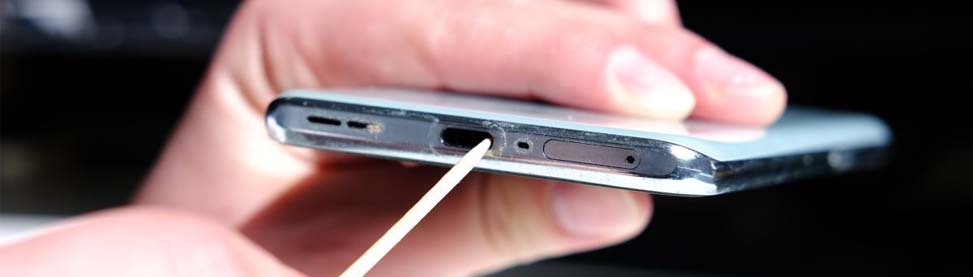
No matter how many times you plug your iPhone in to charge, it won’t charge. This is frustrating, especially when you need your phone urgently. If this sounds familiar, your charging port may be the problem. In this guide, we will cover the signs and causes of iPhone charging port repair, along with steps to fix them all in simple detail.
Causes of iPhone Charging Port Damage
- Dust and debris buildup.
- Frequent plugging and unplugging
- Using low-quality chargers
- Moisture or water exposure
- Rough handling of the cable
- Inserting the charger incorrectly
- Physical damage or drops
Signs You Need iPhone Charging Port Repair
Problem: Charging is slow, stops randomly, or doesn’t start.
Cause: Worn-out or damaged charging port components.
Fix: Professional iPhone charging port repair.
Watch for these common signs:
- The Cable feels loose in the port
- Phone only charges when held in a certain position
- No charging response at all
- Charging starts and stops repeatedly
- Phone connects to charger, but battery doesn’t increase
If you notice these issues, it’s likely time for a replacement.
Charging Issues vs Battery Problems
Problem: You’re not sure if it’s the port or the battery.
Cause: Similar symptoms can confuse users.
Fix: Look for key differences.
| Issue | Likely Cause | What You Notice | Quick Check | Solution |
| Phone not charging at all | Charging port issue | No response when plugged in | Try another cable/adapter | Port repair |
| Charges only at an angle | Loose or damaged port | The Cable feels loose | Hold the cable and see if it works | Port replacement |
| Charging stops randomly | Dirty or worn port | Charging connects and disconnects | Clean the port gently | Cleaning or repair |
| Charges but drains fast | Battery problem | The Battery drops quickly | Check battery health | Battery replacement |
| Phone overheats while charging | Battery fault | Gets hot during charging | Remove the charger and observe | Battery check |
| Slow charging | Weak battery or connection | Takes too long to charge | Use the original charger | Battery or port check |
| No connection to the computer | Port issue | Phone not detected | Try a different USB cable | Port repair |
Can a Short Circuit Cause Charging Problems?
Problem: Your phone suddenly stopped charging after a power issue.
Cause: Internal short circuit due to voltage spikes or water damage.
Fix: Expert repair to fix a short-circuited phone.
Short circuits can damage the charging port and other internal parts. This is not a DIY fix. Trying to repair it yourself may cause more damage.
Common iPhone User Mistakes That Damage the Port
Problem: Charging worked fine before, but now it doesn’t.
Cause: Everyday habits that wear out the port.
Fix: Avoid these mistakes going forward.
Common mistakes include:
- Forcing the charger into the port
- Using cheap or damaged cables
- Charging your phone in dusty environments
- Pulling the cable out roughly
- Ignoring early charging issues
These habits slowly damage the port and lead to failure.
When to Visit a Repair Store
Problem: You’ve tried everything, but your phone still won’t charge.
Cause: Internal damage that needs tools and expertise.
Fix: Visit a smart device repair expert.
You should seek professional help if:
- Cleaning the port didn’t work
- Multiple cables and adapters failed
- The port looks physically damaged
- Your phone does not show any sign of charging.
At this point, a proper inspection is the safest option.
Why Choose Professional iPhone Charging Port Repair
Problem: You don’t want to risk making the problem worse.
Cause: DIY fixes can damage sensitive components.
Fix: Trust trained technicians.
Professional repair ensures:
- Safe handling of internal parts
- Accurate diagnosis
- Quality replacement components
- Long-term performance
Visit CellPhones4Sure for Fast Repair
If your iPhone’s charging port is not working, don’t wait. Small issues can turn into bigger problems. CellPhones4Sure offers fast and reliable iPhone charging port repair using quality parts. You’ll get a quick service and expert diagnostics for all iPhone issues at our store with a convenient location and skilled technicians ready to help. Walk in today or contact us to get your device fixed in an efficient manner.
FAQs
How do I know if the iPhone charging port is damaged?
If your phone doesn’t charge or charges slowly, or only if you hold it at certain angles, the port could be damaged.
Is there a way to clean my charging port at home?
Of course! You can clean your iPhone’s charging port at home by using a soft brush or a toothpick with a soft cloth.
How much time is needed to fix a charging port?
Most repairs are finished on the same day, depending on the problem.
Should you repair your phone or consider replacing it?
If the issue is only the charging port, repair is usually much cheaper than replacing the phone.